AI Scheduler
Put the scheduler on the CC line.
Most meetings don't start from a link. They start in a thread. CC the scheduler on that thread and it comes back with a drafted reply carrying times that are actually open. You approve, it sends from your own Gmail, and when the other side answers with a pick, the meeting books itself. Your booking pages are all still here for when a link is the right move.
Included on the free plan. No credit card.
The link was never the hard part.
Every scheduling tool gives you a link. The hard part is everything around it: the thread where the meeting actually gets negotiated, the “does Tuesday work?” volley, the reschedule email you keep meaning to answer. That work never touched the link.
So we put the scheduler where the work happens: in the email. Three ways, below. Each one runs on your real availability rules, and none of them sends a reply to a prospect without your approval.
One thing to be clear about: you can still send booking links. The AI scheduler is an addition, not a replacement. Booking pages, Schedule Pages, Rep Cards, reminders, payments all keep working exactly as they do today. Send a link when a link fits; CC the scheduler when the scheduling is happening in the thread.
CC your scheduler.
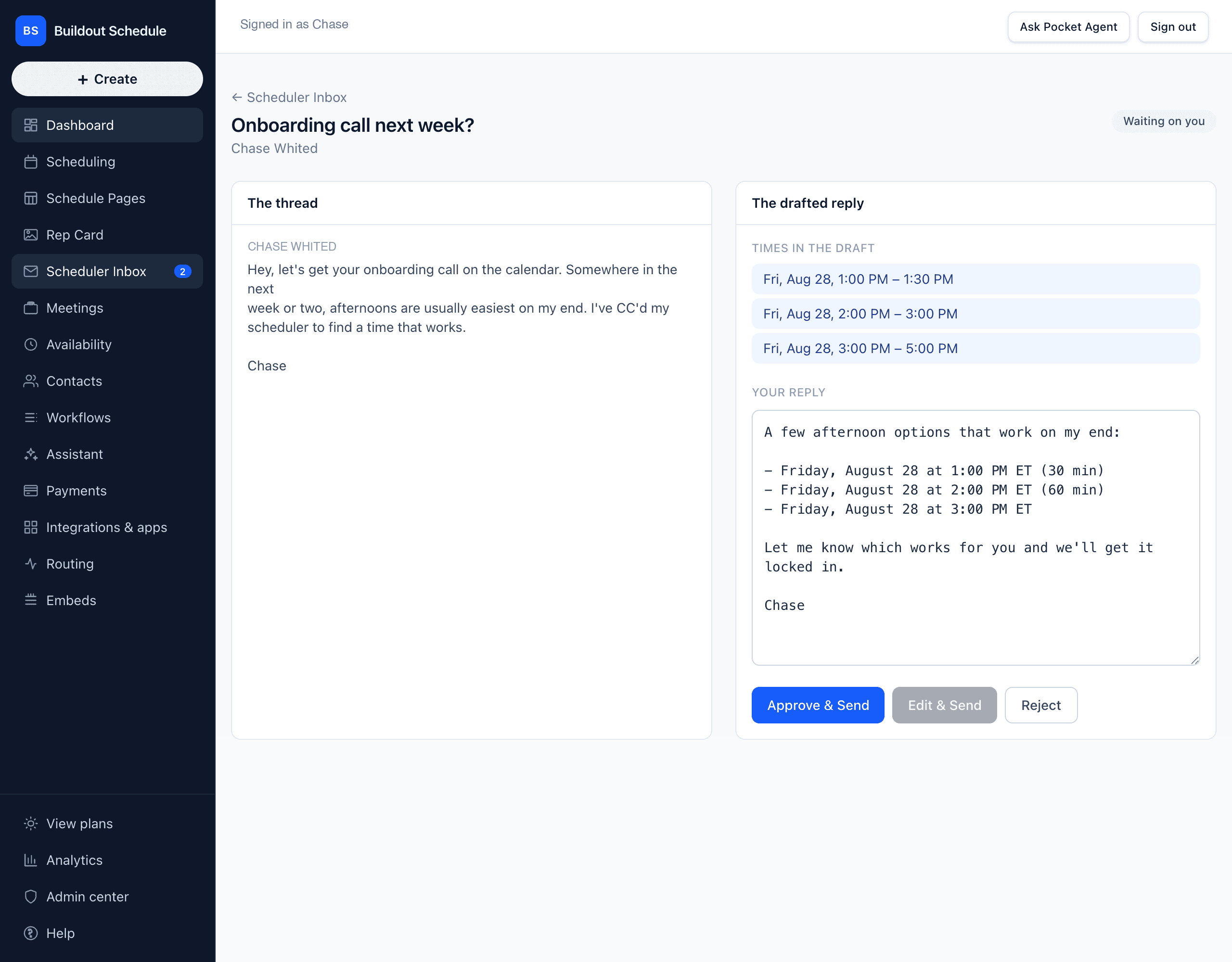
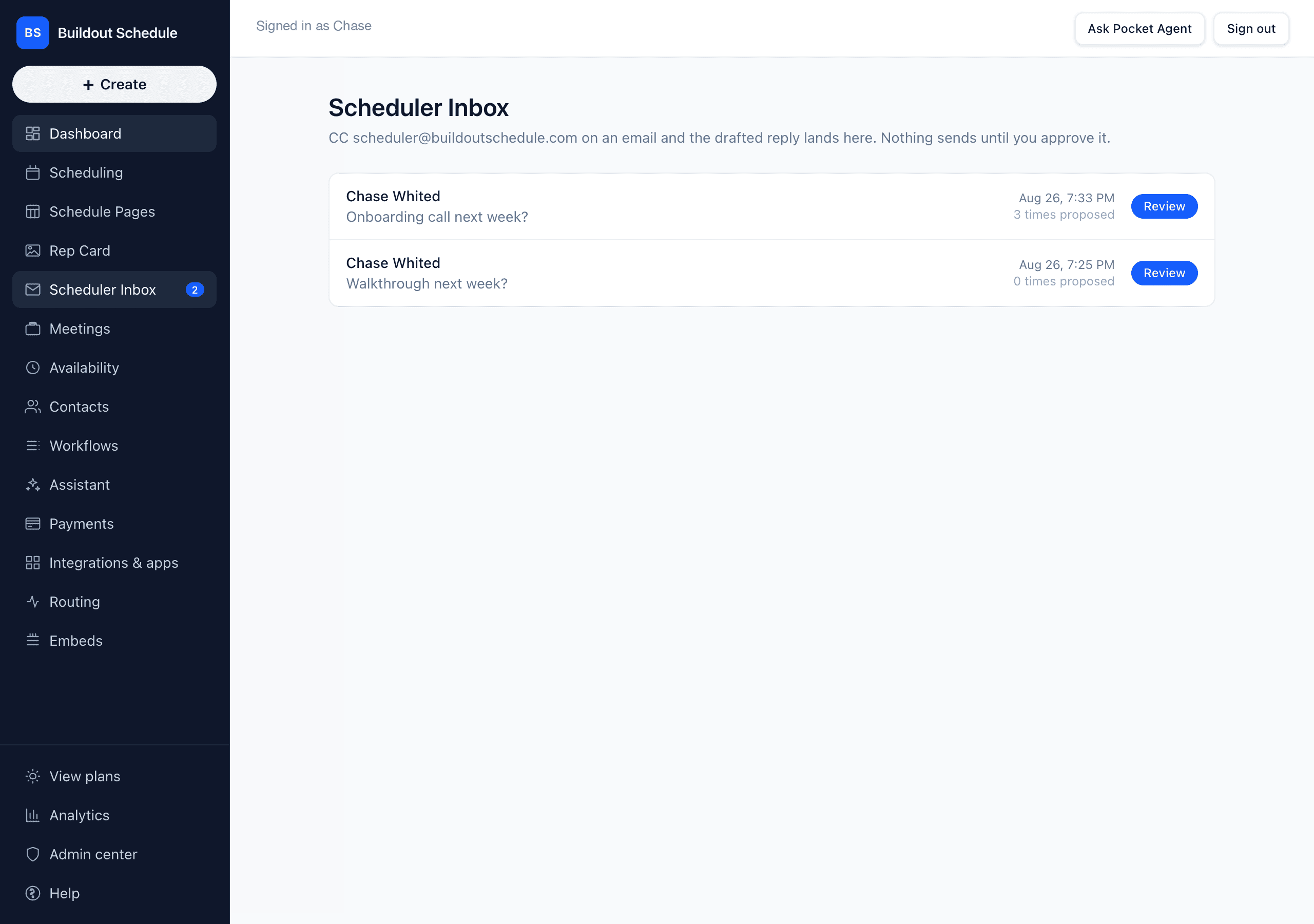
Add scheduler@buildoutschedule.com to the CC line of the email you were already writing. The reply comes back drafted for you, carrying two or three times that are actually open on your calendar.
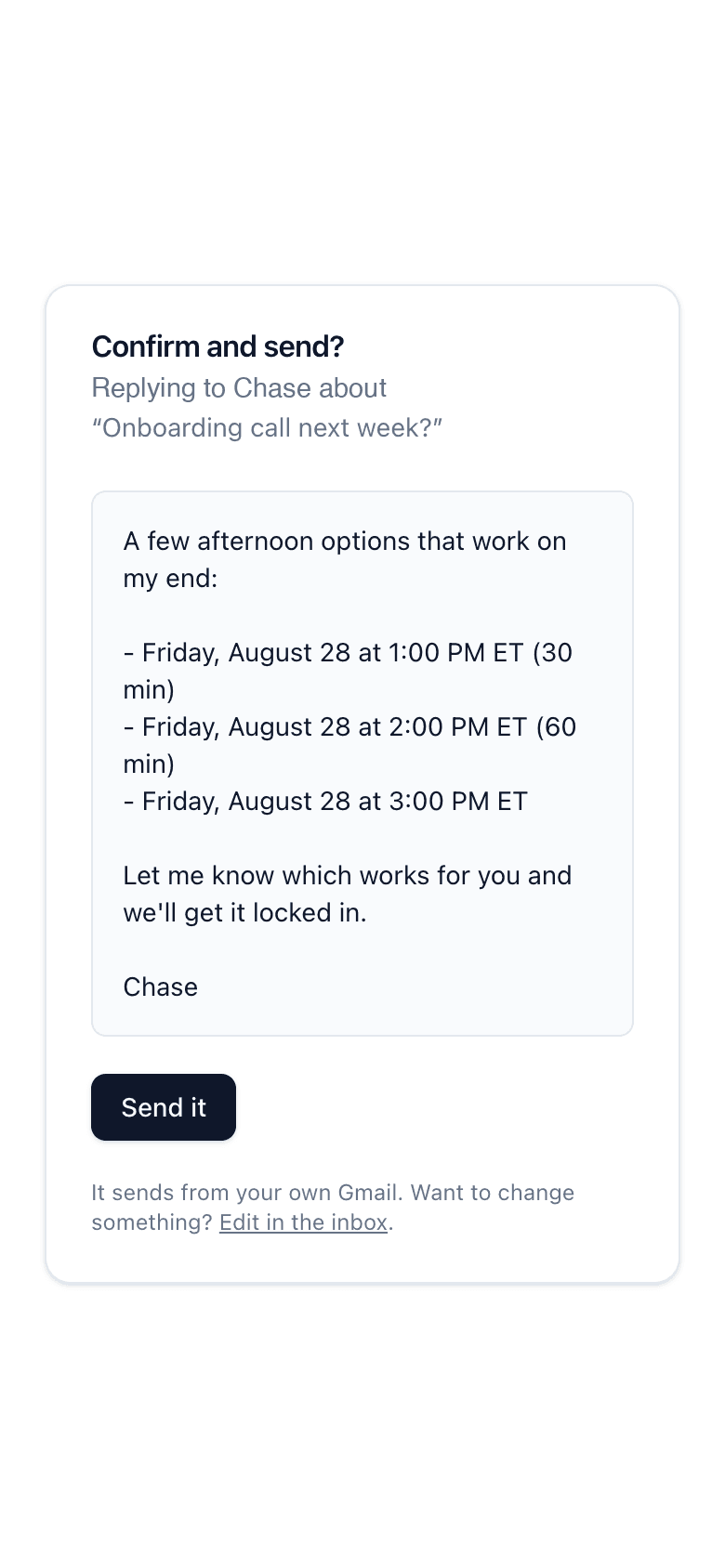
The draft lands in your approval inbox with the original thread beside it. You approve every reply before it goes out, no autopilot in v1. Approved replies send from your own Gmail, so the prospect gets an email from you, not from a robot.
CC is visible. BCC is invisible.
If you’d rather the prospect not see an extra address on the thread, BCC the same scheduler address instead. It works exactly the same way: the scheduler still reads the thread and the draft still waits in your approval inbox. CC when you don’t mind them seeing you use an assistant. BCC when you’d rather not.
Prefer a label instead of a CC?
Apply the Buildout/Draft-with-scheduler label to any Gmail thread and the scheduler drafts the reply, with no address on the thread at all. Opt-in per thread: we only touch labeled threads, and the label comes off once the draft is waiting in your approval inbox.
They reply. It books.
When the other side answers your approved reply choosing one of the proposed times, the meeting books for real: the slot is checked again, the calendar invite goes out with the Meet or Zoom link, and the confirmation and reminders run like any other booking.
If the slot got taken in the meantime, or they say none of those work, the scheduler drafts a reply with three fresh open times instead. A counter-proposed time never books on its own; that draft waits for you. And the booked-confirmation note to the prospect stages through your approval inbox too, unless you flip on auto-send for confirmations.
Here's what you actually type.
That highlighted line is the command. Everything else is the email you were sending anyway: same recipient, same subject, your own sign-off.
The scheduler turns that one line into a drafted reply proposing three windows that are actually open on your calendar, and the draft waits in your approval inbox like every other reply.
To: alan@acme-roofing.com
Cc: scheduler@buildoutschedule.com
Subject: Follow-up on Tuesday's proposal
Alan — good talking Tuesday.
The revised proposal is attached, with the updated numbers on page two. Worth a call before your crew starts the spring push.
Scheduler, propose three 30-min windows next week that work for both of us.
John
Owner, Peak Construction
The AI works within your rules.
This isn't a generic AI. It's yours. Set your rules once, and the AI proposes what you let it propose — not whatever the calendar has room for.
Every draft the AI writes stays inside this window.
You decide what the AI's allowed to propose.
A guest asks to move the meeting and the AI answers with new times — without a rule, one of those times could be 9am tomorrow. Set it to afternoons only and every proposal stays there. Reschedules, CC replies, all of it.
To: alan@acme-roofing.com
Cc: scheduler@buildoutschedule.com
Alan — revised numbers attached. Worth a call.
Buildy, only afternoons next week, 30 min.
John
Pick the word that tells the AI you're giving it an instruction.
The default is "Scheduler," but set it to whatever fits how you write — "Buildy," "Book it," "@AI." Your call. When your word shows up in an email you send, the rest of that line is treated as a direct instruction.
Discovery call
30 min · video
Any time the calendar allows
Internal sync
15 min · video
Afternoons only
Different rules for different meetings.
Discovery calls can take any open slot. Internal syncs stay locked to your afternoon window. Each event type carries its own preferences on top of your account default.
Every plan includes a monthly amount of AI drafts and transcripts (what's included). The booking-page slot picker and reschedule replies never count against it.
Or skip the CC line and draft from inside Gmail.
The free Chrome extension puts a Draft with scheduler button next to Send. One click drafts a reply from the meeting thread you’re already in. Same real open times, same rule that nothing sends until you hit Send.
To: alan@acme-roofing.com
Cc: scheduler@buildoutschedule.com
Subject: Follow-up on Tuesday's proposal
Alan — good talking Tuesday.
The revised proposal is attached, with the updated numbers on page two. Worth a call before your crew starts the spring push.
Scheduler, propose three 30-min windows next week that work for both of us.
John
Owner, Peak Construction
Natural-language booking.
On your public booking page, guests get a text box above the slot grid. They type “next Tuesday afternoon” and the grid narrows to the slots that match. The parse comes back sub-second.
The grid never goes away. The text box is an accelerator, not a replacement, so a guest who ignores it books exactly the way they always did. The full walkthrough →
Mon
Tue
Wed
AI rebooking.
A guest replies to their confirmation: “can we move it?” The answer goes back in the same thread: three new times that are actually open on your calendar. The guest clicks one and both calendars update. You never entered the thread.
The AI proposes, the guest picks. It never moves a meeting on its own, and a reply it can't parse gets forwarded to you untouched. How rebooking works →
Marcus Cole · replying to his confirmation
Something came up Thursday — any chance we can move it?
Buildout Schedule · same thread
Sure — here are three that work:
Bring your own AI.
Everything above is our AI working your inbox. If you run your own AI tools, they can work the calendar directly: the same booking engine has an MCP server, so Claude Code, Cursor, or anything else that speaks MCP can read your live availability and book real meetings. The 60-second setup →
Build yours in 5 minutes.
Pick a template, swap in your details, publish. Free plan, no credit card.
Goes well with
Common questions
Does the AI send email on its own?
No. Every reply the AI drafts waits in your approval inbox next to the original thread. You approve, edit, or reject. The one opt-in exception: once a meeting is booked, you can turn on auto-send for the short booked-confirmation reply. Everything else waits for your click.
What stops it from proposing a time I don’t have?
The AI can only pick from slots your availability rules already allow: buffers, minimum notice, busy calendar blocks, all of it. If it can’t find real open times, it tells you instead of inventing some.
What does the other person see?
A normal email reply from your address proposing two or three times. No booking link, no branded portal, no “powered by” footer in the thread. When they pick, both calendars get the invite.
Which email accounts does this work with?
Gmail today, through the same Google connection that syncs your calendar. Approved replies send from your own account, so the thread stays yours.
Does the booking page still exist?
Yes. Everything here is a layer on top of the scheduler you already have: booking pages, Schedule Pages, Rep Cards, reminders, payments. Send a link when a link is the right move; CC the scheduler when it isn’t.